02. Mixins / Extending Object Functionality with Mixins
An Object is Prototype-linked to a Single Object
Recall that an object's .prototype property points to just one object. This is because JavaScript only supports single inheritance. If there is an object A and an object B, object C can only be prototype-linked to either A or B.
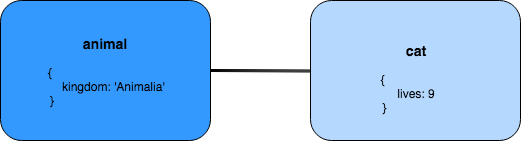
The cat object is prototype-linked to a single object: animal
Object extension
SOLUTION:
- The `helicopter` object has no properties of its own
- `helicopter` is prototype-linked to `aircraft`
L4 05 Multiple Inheritance Mixin Intro V5
Mixins
If a JavaScript object can only be prototype-linked to a single object, how can we go about extending properties and methods from multiple different sources? A mixin allows us to just that!
A mixin is a technique that takes the properties and methods from one object and copies them over to another object. In other words: a mixin is an technique that provides some useful functionality, but is not meant to be added to the prototype chain.
🍦All Good Comes from Ice Cream 🍦
Did you know that the term mixin is actually inspired by ice cream? The concept of a basic flavor being mixed in with several different extra items (e.g. nuts, fudge, cookies, sprinkles, etc.) was later adopted by computer scientists in object-oriented programming. What a tasty revelation!
Object.assign()
The simplest way to implement the mixin pattern is to use Object.assign(). Object.assign() is a method that copies an object's own (non-inherited) properties from one or more source objects into a target object, then returns the updated target object. In other words, Object.assign() adds to the target object by merging in the source object(s). Consider the following:
let target = {};

let source = { number: 7 };

Object.assign(target, source);

console.log(target);
// { number: 7 }
The first argument passed in, target, is the destination that receives the properties copied from the source object, source. Note that Object.assign() does not create and return a new object; it directly modifies then returns the same target object that was passed in! As such, values of existing properties will be overwritten, while properties that don't exist in the source object will remain intact:
let target = { letter: 'a', number: 11 };

let source = { number: 7 };

Object.assign(target, source);

console.log(target);
// { letter: 'a', number: 7 }
In the above example, the value of target's number property was overwritten, while its letter property was ignored.
Multiple Source Objects
Object.assign() can even take in multiple different source objects. Let's create a platypus object by mixing in properties from other animals:
const duck = {
  hasBill: true
};
const beaver = {
  hasTail: true
};
const otter = {
  hasFur: true,
  feet: 'webbed'
};

const platypus = Object.assign({}, duck, beaver, otter);

console.log(platypus);
// { hasBill: true, hasTail: true, hasFur: true, feet: 'webbed' }
Great! After merging an empty target object (i.e., an object without properties of its own) with the properties from duck, beaver, and otter, the target object is returned with all four properties. It is important to note that the platypus object is not prototype-linked to the three other objects! That is, platypus doesn't exist in any of the three source objects' prototype chains, and vice versa:
platypus.constructor;
// Object()

platypus.isPrototypeOf(duck);
// false

duck.isPrototypeOf(platypus);
// false

platypus.isPrototypeOf(beaver);
// false

beaver.isPrototypeOf(duck);
// false

platypus.isPrototypeOf(otter);
// false

otter.isPrototypeOf(platypus);
// false
Let's take a look at all this in action below!
10 - SC - Object.Assign()
⚠️ Object.assign() Compatibility ⚠️
Object.assign() is a great way to copy properties own properties into a given object. Keep in mind that since it was introduced to the official specification in ES2015 (ES6), you may need to review browser compatibility to make sure it'll work in your environment.
Target object
SOLUTION:
- `platypus` is an object with four properties
- `duck` becomes an object with four properties
- `platypus === duck`
Quiz: Mixins
SOLUTION:
- A mixin supplies properties and/or methods that can be shared
- We can leverage `Object.assign()` to "mix in" properties and methods from a number of objects into a composite object
Summary
A mixin is a technique that copies data and functionality from a source object (or source objects) to a target object. We can use ES6's Object.assign() to return a target object with properties from one or more source objects "mixed into" that target object.
In the next section, we'll take a look at factory functions and functional mixins -- how they're built, and how we can use them to create objects without the use of the new operator!
Further Research
- Object.assign() on MDN